The job you lost was a missed message
Most enquiries go cold because you couldn't get to your phone in time — or you were too knackered to quote by the evening.
See it handle a real enquiry
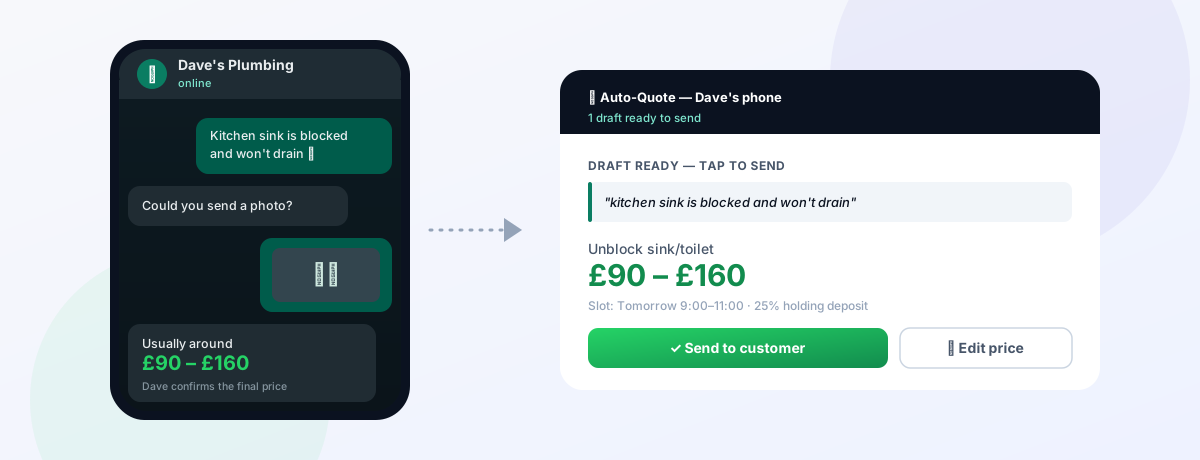
A blocked-sink job, start to finish — the customer's chat on the left, and what lands on your phone to approve on the right.
Simulated on a sample plumber's prices. Open the full demo →
The whole thing, in one glance
From first message to a chased review — most of it without you stopping work.
What it does
Everything between a customer's first message and a booked, paid, reviewed job — handled on the WhatsApp you already use.
Replies in seconds
Customers get an answer the moment they message — even when you're under a sink or up a ladder. No more cold leads.
Quotes on your rules
You set the call-out fee, day rate, standard prices and what always needs your sign-off. It never invents a number.
Books your slots
Offers your real availability and can take a holding deposit so customers actually turn up.
Chases the review
After the job it asks the customer for a review on whatever platform you use — Google, Checkatrade or Trustpilot.
Your number stays yours
Runs on a separate business line. Flip it off whenever you want to take a chat yourself.
You're always in control
Collect & approve, or let it auto-book the small stuff. Big or unusual jobs always route to you first.
Automated WhatsApp quoting vs the alternatives
Why the speed of that first reply is what actually wins the job.
| Automated WhatsApp quote | Reply manually yourself | Website contact form | Miss the message | |
|---|---|---|---|---|
| Speed of first reply | Seconds | Hours — when you stop | Hours to days | Never |
| Works while you're on the tools | Yes | No | Form sits unread | — |
| Gives an instant ballpark | From your rates | Only when you're free | No | No |
| Available 24/7 | Yes | No | Collects, doesn't reply | — |
| Captures every lead | Logged automatically | If you remember | Sometimes | No |
| You approve the final price | Yes | Yes | Yes | — |
| Effort from you per enquiry | Almost none | High | Medium | — |
The pattern is simple: most customers book whoever replies first. Automated quoting makes that first reply instant, then still lets you approve or adjust the final price. See the pricing page for plans.
How it works
It sits on top of the WhatsApp you already use — wherever the customer comes from.
Customer messages
"Hi, are you available?" The assistant replies instantly and asks what they need doing.
Gets details & photos
It collects the job and asks for a photo or short video before any price is given.
Estimates & books
Gives an honest estimate from your pricing rules and offers your next free slots.
You confirm the price
The job, pics and suggested price hit your phone. One tap to send. Big jobs come to you first.
It never invents a price — and you approve every one
The assistant only ever quotes from the rules you set. The final price lands on your phone for one-tap approval before the customer sees it, and any large, unusual or out-of-scope job routes straight to you instead of being priced automatically.
It's a quoting assistant that works the way you already do — not a black box guessing numbers on your behalf.
Simple monthly pricing
Early-access pricing — full details, including the one-off setup fee, are on the pricing page. Pricing is reviewed annually and may be revised each year with advance notice before any change takes effect. Where a service is billed monthly, you may cancel at any time, with or without reason. We reserve the right to suspend or terminate service in the event of misuse, breach of our terms, or non-payment. Full terms & conditions apply.
What is WhatsApp auto-quoting? Key terms in plain English
Quick, jargon-free definitions for UK tradesmen and service businesses.
- WhatsApp auto-quote
- An AI assistant that answers customer enquiries on your WhatsApp, asks for photos and details, prices the job on your own rates, gives an instant estimate, books it in and chases the review — all while you're on the tools.
- Instant quote (estimate)
- Giving a customer a price or a clear price range within seconds of their enquiry, automatically, instead of hours or days later. Speed is what stops jobs going cold and losing out to whoever replied first.
- Job triage
- Automatically sorting incoming enquiries: quoting the simple, well-understood jobs on your prices straight away, while flagging bigger or unusual jobs for you to survey — so nothing gets mis-quoted.
- Rate card
- Your own set prices for common jobs — call-out fee, day rate, standard job prices — that the assistant uses to build quotes, so every estimate reflects what you would actually charge rather than a generic guess.
How we build WhatsApp auto-quoting
How we build it
The assistant quotes only from your rules — your call-out fee, rates and standard job prices — and splits every enquiry into two piles: jobs it can price on sight, and jobs that always come to you. It asks for a photo before pricing anything, and by default the draft quote lands on your phone for one-tap approval before it sends.
Why our approach is different
It never invents a price. Anything it doesn’t recognise, or anything on your “always ask me first” list, gets routed to you with the photos already gathered — it doesn’t guess. And it runs on the official WhatsApp Business API, so your number stays safe.
Real implementation details
- Your rate card encoded as the pricing rules the assistant works from.
- Photo or short video requested before any number is given.
- Draft-to-your-phone approval by default; you can change the figure or send as-is.
- An explicit escalate list for surveys, complex or safety-critical jobs.
Common mistakes businesses make
- Auto-sending prices with no owner approval.
- Trying to auto-quote jobs that genuinely need a site visit.
- Running it off an unofficial WhatsApp tool.
- Pricing without asking for a photo first.
Our recommendation
Keep approval on by default, define your escalate list carefully, and start by automating just your top five standard jobs. The trade-by-trade breakdown is in the automated WhatsApp quoting guide.
WhatsApp quoting guides
- Automated WhatsApp quoting for tradesmenThe full breakdown for plumbers, electricians and gas engineers — what to auto-quote and what to escalate.
- WhatsApp automation ROI calculatorWork out what slow replies are costing you, on your own numbers.
Frequently asked questions
Does it make up prices?
No. The assistant only quotes from the pricing rules you set — your call-out fee, day rate, standard job prices and what always needs your sign-off. Anything outside your rules, or any big or unusual job, routes straight to you instead of being priced automatically.
Do I lose control of my quotes?
No. By default the assistant drafts the estimate and the final price comes to your phone for one-tap approval before anything is sent to the customer. You can adjust the price or take a job over at any point, and switch the assistant off whenever you want to handle a chat yourself.
Do I need a new phone number?
No. It runs on a separate business WhatsApp line so your jobs stay organised and your personal number stays yours. Customers from Checkatrade, a van sign or word of mouth all land in the same place.
Which trades is it for?
It's built for plumbers first, with electricians and gas or heating engineers next. If your customers message to describe a job and you quote it, we can probably build a ruleset for your trade — just ask.
Does it take deposits and chase reviews?
Yes — it can offer your real availability and take a holding deposit so customers actually turn up, and after the job it asks the customer for a review on whatever platform you use (Google, Checkatrade or Trustpilot).
How much does it cost?
See the pricing page for current early-access pricing, including the one-off setup that builds your pricing rules. Your first month is free and you can cancel anytime.
Stop losing jobs to a slow reply
Watch the demo, then talk to us — we'll build your pricing rules and set you up free for the first month.