Part of our complete guide to AI search visibility.
Every AI visibility tool shows you a neat percentage. Behind it is something much plainer: a list of questions, asked over and over, with someone counting how often your name comes up. Once you know that, you can tell a useful number from a misleading one.
Google gives you Search Console. It isn't perfect, but it tells you which searches showed your site and how often people clicked. AI assistants give you nothing like that. When ChatGPT recommends three plumbers in Leeds, nobody sends the plumbers a report. If your business wasn't one of the three, you'll never see that the conversation happened.
That gap is why a whole category of AI visibility trackers has appeared. They all work in roughly the same way, and none of them can see inside ChatGPT. They ask it questions from the outside, just as a customer would, and record what comes back.
The short answer
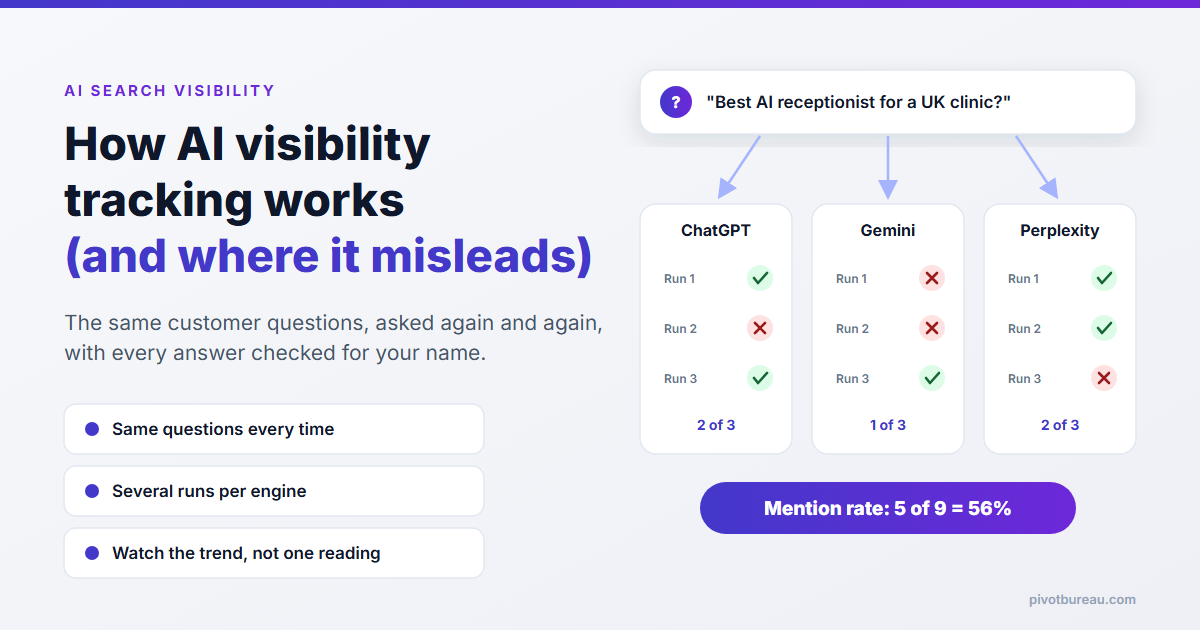
An AI visibility tracker keeps a fixed list of questions your customers might ask. On a schedule, it sends each question to engines such as ChatGPT, Gemini, Perplexity and Google's AI answers, saves the full reply, and checks three things: were you named, where in the answer, and which websites did the AI cite. Then it turns thousands of those yes/no checks into a few numbers and draws a line showing how they change over time.
That's it. There's no secret data feed from OpenAI or Google. The quality of the tracking comes down to how good the questions are and how many times each one is asked.
What a tracker does, step by step
1. Choose the questions
This is the step that matters most and gets the least attention. The questions should sound like a real customer: "who does AI receptionists for dental practices in the UK?", "best guest registration system for a holiday let", "is there a plumber in Dewsbury who does weekends?". A tracker that only asks "what is [your brand]?" will report great visibility and tell you nothing, because the AI already has your name in the question.
Good question sets mix three kinds: category questions ("best X for Y"), problem questions ("how do I stop missing calls when I'm with a customer?") and comparison questions ("X vs Y"). Location belongs in them too, if you serve a local area.
2. Ask each engine, more than once
The tracker sends every question to each engine it covers. Some use the engines' APIs; others drive a real browser so the answer matches what a person sees, which can differ, especially when the engine decides to search the web first. Either way, a careful tracker asks the same question several times, for reasons I'll come to in a minute.
3. Save the whole answer
Not just "mentioned: yes". The full text and any cited links are kept, because that's what lets you go back and see why a number moved. When your mention rate drops, the saved answers show whether a competitor replaced you, whether the AI stopped searching the web, or whether it's quoting an old directory listing with your previous address.
4. Check each answer
Each saved answer is checked for your business name and its common variations, the position of the first mention, the competitors named alongside you, and the sources cited. Some tools also judge tone (recommended, neutral, warned against). That last part is usually done by another AI model reading the answer, so treat it as a rough guide.
5. Roll it up and compare
Finally, all those checks become a handful of rates, and the rates are plotted week by week. The single number on a dashboard is only useful as a line: up, flat or down against the same questions asked the same way.
Why one run of a question tells you very little
Ask ChatGPT the same question twice and you can get two different answers. That isn't a bug. These models generate text with a degree of randomness, they may or may not search the web on a given turn, and the model itself gets updated without notice. So a single check is closer to a coin toss than a measurement.
If you'd only checked on run 2, you'd conclude the AI doesn't know you. If you'd only checked on run 1, you'd think you'd cracked it. Neither is true. The honest answer is a rate, and the rate only becomes trustworthy once you have enough runs and enough questions behind it.
I learned a version of this the hard way with my own website's Google data. I built an n8n workflow that compares my Search Console numbers every couple of days and warns me about drops. Early on, it flagged two pages as having "dropped to zero". Nothing had happened to them. Each was getting well under one impression a day, so a stretch of zero days was just normal noise, and my alarm was treating it as a real fall. AI answers are noisier still, which is why small samples deserve the same suspicion.
The numbers trackers report, and what they mean
Different tools use different labels, but most dashboards come down to these:
- Mention rate: out of all the answers collected, the share that named you. This is the core number, and the closest thing to a fair "are we visible?" measure.
- Share of voice: your mentions as a share of all brand mentions across those answers, you versus competitors. Useful when the AI always names several businesses.
- Average position: when you are named, how early in the answer. Being first in a list of three matters more than a footnote at the end.
- Citation rate: how often the AI links to your website as a source. Being cited is different from being recommended; an AI can quote your blog while recommending someone else.
- Accuracy: whether what the AI says about you is right: services, area, opening hours, prices. A mention with the wrong phone number isn't a win.
Many tools blend these into one 0–100 figure. That's handy for a headline, and we explain one way of building it in what an AI visibility score is. But when it moves, open the parts underneath. I've seen in my own testing work how a single blended score can rise while the thing you actually care about gets worse; I wrote about it in when AI accuracy scores mislead.
Where tracking misleads you
The questions decide the answer
Whoever writes the question list controls the result. Easy, branded questions make everyone look visible. Questions in a niche you don't serve make you look invisible. Before you trust any dashboard, read the actual questions it's asking.
Personal and local differences
A logged-in user with chat history, a user in Manchester and a tracker running from a data centre in the US may all get different answers. Trackers usually run without history, which is fair and consistent, but it isn't exactly what your customer sees.
API answers aren't always the app answers
Some tools ask the models through their APIs. The consumer apps can behave differently, particularly in whether they search the web. Neither is wrong, but know which one your tool measures.
It tells you what, not why
A falling mention rate doesn't explain itself. The fixes are the usual ones: make sure AI crawlers can reach your site (OpenAI documents its crawlers here), keep your facts consistent across the web, use schema markup, and publish pages that answer real questions clearly. The tracker only tells you whether that work is landing. For the common causes, see why a business is invisible to ChatGPT and why you're not showing in Perplexity or Gemini.
Search Console only covers part of it
Google says that traffic from its AI features, such as AI Overviews, is counted in Search Console's normal web search figures (Google Search Central). That's useful, but it's mixed in with everything else, and it doesn't cover ChatGPT, Perplexity or the Gemini app at all. It also can't record the times an AI named you without linking to you.
How to track it yourself for free
You don't need a paid tool to start. You need patience and a spreadsheet:
- Write 10–15 questions a real customer would ask, with your service and area in them. Mix category, problem and comparison questions.
- Open ChatGPT, Gemini and Perplexity in a private or logged-out window so your own history doesn't colour the results.
- Ask each question three times per engine. Note for each answer: named or not, position, competitors named, sites cited.
- Work out your mention rate per engine and overall. Save the answers you got.
- Do it again next month with exactly the same questions. Only compare like with like.
That's slow, roughly an hour or two each time, but it's the same measurement the paid tools make, just with fewer runs. If you'd rather have a starting reading without doing it by hand, our free AI SEO audit puts real customer questions to AI search and reports whether you were mentioned, alongside the normal SEO checks. For a checklist of what to fix once you have the numbers, use the AI SEO audit checklist, and if you want to see whether ChatGPT is recommending you specifically, there's a walkthrough in how to check if ChatGPT recommends your business.
FAQ
How does AI search visibility tracking work?
A tracker keeps a fixed list of customer questions, asks them to AI engines like ChatGPT, Gemini and Perplexity on a schedule, saves each answer and checks whether your business was named, where, and which sources were cited. The results become rates such as mention rate and share of voice, compared over time.
Why do AI visibility results change from one day to the next?
AI answers aren't fixed. The same question can get a different answer each time, and results also shift with location, model updates and whether the engine searched the web. That's why a good tracker asks each question several times and reports a rate.
Can I track AI search visibility for free?
Yes, roughly. Ask 10–15 real customer questions in ChatGPT, Gemini and Perplexity a few times each in a private session, record whether you were mentioned, and repeat monthly with the same questions.
Does Google Search Console show AI search visibility?
Only partly. It counts impressions and clicks from Google's own AI features inside normal web search data, but not ChatGPT, Perplexity or the Gemini app, and not mentions without a link.